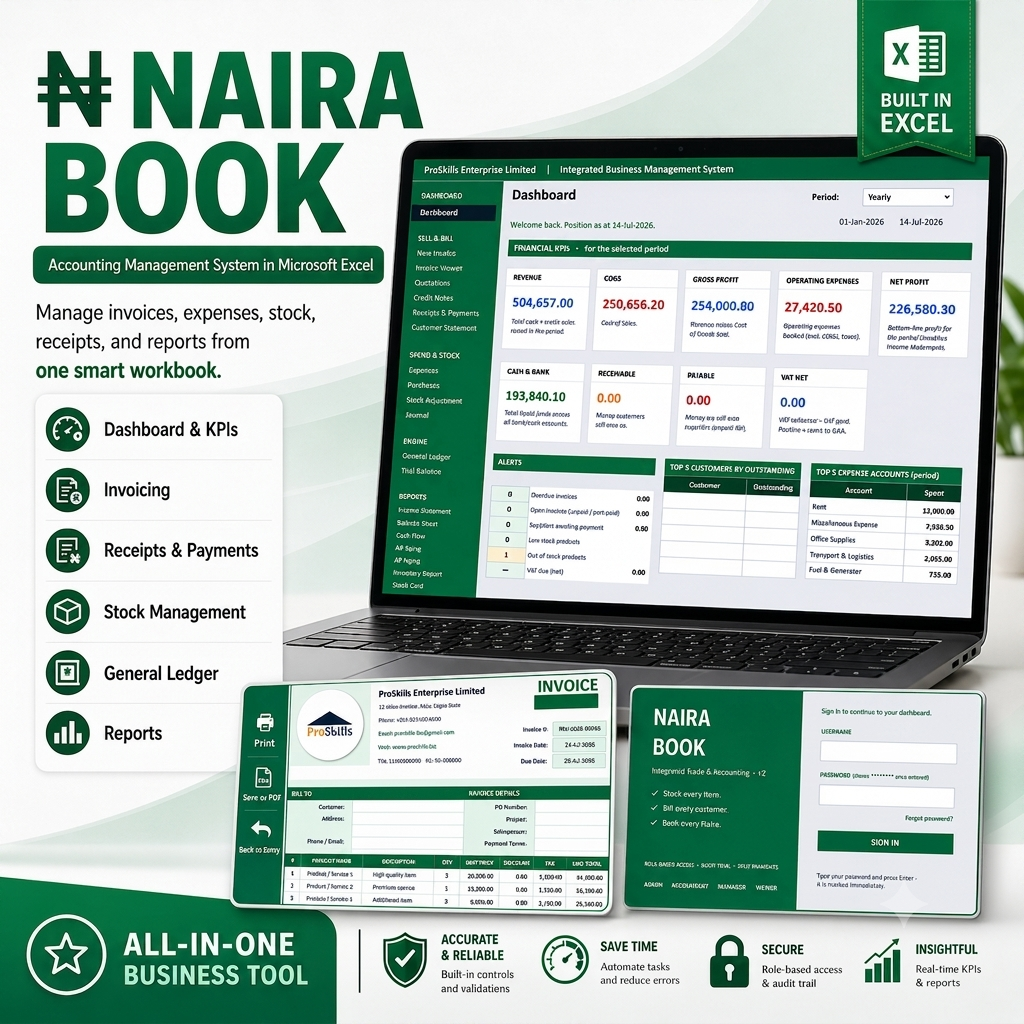
Accounting Management System Application in Microsoft Excel

Click the video below to watch and learn how the application system works
GET THE WORKBOOK
NAIRA BOOKS
Accounting for Nigerian Businesses
Stop Juggling Excel Sheets.
Start Running Your Books Like a Pro.
The first Excel-based accounting system built specifically for
Nigerian SMEs — no monthly fees, no cloud lock-in, no accounting degree required.
One-time payment ● Works offline ● Yours forever
25
CONNECTED SHEETS
6,526
LIVE FORMULAS
2,000
ROWS PER LEDGER
01 The Hidden Costs of Doing Books the Hard Way
If you run a small or medium business in Nigeria, one of these five scenarios is probably costing you money every single month. Maybe all of them.
Your Excel workbook is a ticking time bomb.
You've built formulas on top of formulas for years. One day someone sorts a column or deletes a row, and suddenly your March revenue shows ₦47 million instead of ₦4.7 million. You spend the weekend rebuilding — and never fully trust the numbers again.
The cost: Wasted weekends, lost confidence in your own reports, and costly filing mistakes.
You're paying ₦18,000+ every month for software you barely use.
QuickBooks, Zoho, Sage — they're great, but you use 20% of the features and pay 100% of the price. And the moment you stop paying, your historical data becomes read-only or disappears completely.
The cost: ₦216,000+ per year in subscriptions — money that could fund inventory, staff, or marketing.
VAT season feels like a fire drill every single month.
The 21st creeps up. You're manually totalling invoices, chasing receipts, cross-referencing bills. You miss the filing deadline once and FIRS penalties wipe out a week's profit. Next month, it happens again.
The cost: Late filing penalties, administrative stress, and a cashflow scar you never forget.
You have no idea if your business is actually profitable.
Your bank balance looks okay this week, but last week it didn't. You sold a lot, but your supplier just sent a bill. Is that a profit? Are you losing money on certain products? You genuinely don't know — and neither does your accountant, who only calls you at year-end.
The cost: Decisions made on feelings instead of facts. Growth stalls; nobody can explain why.
Your accountant is the only one who understands your books.
If they go on leave, get sick, or raise their fees, you're stuck. Your financial information lives in their software or their head, not yours. When the bank asks for statements, you wait three days for a response.
The cost: Dependency risk, slow loan applications, and zero financial literacy in your own company.
02 How Naira Books Fixes All Five Problems
Each of the pains above maps directly to a feature built into the workbook. Not a workaround. Not a half-measure. A direct solution.
Rock-solid formulas, protected by design.
6,526 interconnected formulas built and tested by a professional. Critical account codes are locked into the system so accidental deletions can't break your books. The Trial Balance, Balance Sheet, and Cash Flow each show a ✓ BALANCED indicator — if anything goes wrong, you know instantly.
What it means for you: Zero fear of silent errors. Your reports always reconcile.
Pay once. Use forever. No subscription trap.
A single one-time purchase. No recurring fees. No feature limits. No 'upgrade to Premium' prompts. Your data lives in a regular .xlsx file that opens in Excel 2016+, Excel 365, LibreOffice, or Google Sheets. Stop paying, and nothing breaks.
What it means for you: Save over ₦200,000 per year versus QuickBooks. And you truly own your data.
A FIRS-ready VAT return at the click of a tab.
The VATReport sheet auto-generates a complete monthly filing — Output VAT, Input VAT, Net Payable, TIN, VAT Reg No. — already in the FIRS format. A countdown timer shows 'Days until filing'. The calculation has been reconciled against your invoices and bills so you can trust the number.
What it means for you: File in minutes, not hours. Never miss the 21st again.
Real-time P&L and Cash Flow, without an accountant.
Every time you enter an invoice, bill, or expense, 11 downstream reports refresh automatically. The Dashboard shows you Net Profit year-to-date (or for any period you pick). The Profit & Loss breaks down revenue, COGS, and operating expenses. The Cash Flow Statement explains exactly why your bank balance changed. All reconciled.
What it means for you: Know your profitability every day — not every December.
You own your books. Your accountant becomes a coach, not a gatekeeper.
All your financial data sits in one file on your computer. Share it with your accountant for review, send it to your bank for a loan application, or hand it to a new bookkeeper if your old one moves on. No software, no cloud account, no 'export request' wait times.
What it means for you: Financial independence. Faster decisions. Lower accountant fees.
03 Everything You Get in One Workbook
Nine core modules. Twenty-five interconnected sheets. One unified system.
Invoicing & Billing
Issue professional VAT-compliant invoices in under 60 seconds. Automatic due dates and status tracking.
Multi-Channel Banking
Cash, bank, POS, mobile money, and eNaira — all tracked together in one unified ledger.
Inventory Control
Real-time stock levels, automatic COGS calculation, low-stock alerts on the Dashboard.
Complete Financial Reports
Trial Balance, P&L, Balance Sheet, Cash Flow — all auto-generated, all reconciling.
FIRS-Ready VAT Returns
Monthly VAT in FIRS format with filing deadline countdown. Never miss a 21st again.
Aged Receivables & Payables
See who owes you at a glance. Collect faster. Manage cash outflows precisely.
Period-Filtered Dashboard
View daily, weekly, monthly, quarterly, or yearly figures with one dropdown click.
Fully Offline
No cloud. No subscription. No data leak. Your books stay on your computer.
Effectively Unlimited
2,000 rows pre-built per sheet; Excel Tables auto-extend as you grow.
04 How It Works
From sign-up to your first filed VAT return in under an hour.
STEP 1
Download & Open
You receive the .xlsx file by email immediately after purchase. Double-click to open in Excel, Google Sheets, or LibreOffice. That's the entire 'installation'.
STEP 2
Enter Your Details (30 Minutes, Once)
Fill in your company name, TIN, VAT reg, fiscal year, and opening balances. Add your customers, suppliers, products, and bank accounts. The User Guide walks you through every field.
STEP 3
Start Recording Transactions
Issue an invoice? Type it in. Pay a supplier? Type it in. The system automatically updates your General Ledger, Customer Balances, Aged AR, Dashboard, P&L, Balance Sheet, Cash Flow, and VAT Report — all at once.
STEP 4
Review Reports, File VAT, Make Decisions
Open the Dashboard for today's snapshot. Use the period filter to see any day, week, month, quarter, or year. At month-end, file your VAT return directly from the VATReport sheet. That's it. You're running a real accounting system.
05 What Business Owners Say
AO
Before Naira Books, our VAT filing took two full days of cross-checking. Now it's 15 minutes. The system calculates it while I have coffee. I recovered the cost of the workbook in my very first month by not missing a filing deadline.
Adaeze Okafor
Owner, Okafor Fabrics • Aba, Abia State
★★★★★
Verified
I was paying ₦22,000 per month for cloud accounting software I barely used 30% of. This workbook gives me everything I actually need for a one-time price. The Cash Flow Statement alone changed how I negotiate with suppliers.
Ibrahim Bello
Managing Director, Sahara Logistics • Kaduna, Kaduna State CN
★★★★★
Verified
We run three branches. The branch-tracking in invoices and expenses lets me see which branch is most profitable without a consultant. I now close our monthly books in one day, not one week. My CEO asked what changed.
Chinwe Nwosu
Finance Manager, Emerald Pharmacy Group • Port Harcourt, Rivers State
★★★★★
Verified
What sold me was the Period filter on the Dashboard. One dropdown and I can compare last week to this week, or Q1 to Q2. I finally understand which products actually make money for us. We stopped stocking two unprofitable SKUs last month.
Oluwaseun Adebayo
Founder, GreenMart Groceries • Lagos, Lagos State
MK
★★★★★
Verified
I'm not an accountant. The User Guide walked me through everything in one evening. A week later I pulled a complete P&L for my bank loan application — the loan officer was impressed. We got approved in three days.
Musa Kabir
Co-founder, Kabir Agro Supplies • Kano, Kano State
★★★★★
Verified
My accountant used to be a bottleneck. Now he reviews the books I maintain instead of maintaining them himself. His fee dropped by 40% and my visibility into the business is 10x better. Worth every naira.
Folake Adeniyi
Director, Adeniyi & Co. Consulting • Abuja, FCT
06 Frequently Asked Questions
Q: Do I need to know accounting to use this?
No. The User Guide explains every concept (Debits, Credits, P&L, Balance Sheet) in plain English. You enter transactions; the system does the accounting. If you can fill a form online, you can use this workbook.
Q: What if my computer crashes?
Your data lives in a regular .xlsx file. Save a backup to Google Drive, Dropbox, or a USB stick — just like any other document. We recommend a weekly backup. There's no cloud service to lose access to.
Q: Can my accountant use it too?
Yes, and they'll appreciate the standard double-entry structure. Many accountants prefer this workflow because they can review your books in familiar Excel rather than learning your specific software.
Q: Does it work on Mac / Google Sheets / LibreOffice?
Excel for Mac (2019+) and Excel 365: fully supported. LibreOffice Calc 7+: fully supported (tested). Google Sheets: works with minor cosmetic differences, best for review rather than daily entry.
Q: What if I already have 6 months of data in another system?
Enter your opening balances as of today's date in the Chart of Accounts. You don't need to re-enter historical transactions. From today forward, your books are current.
Q: Can I track multiple business locations or branches?
Yes. Each invoice, expense, and payment has a Branch column. The CompanySetup sheet lets you define up to 10 branches. Reports can be filtered by branch.
Q: What about withholding tax (WHT) on services?
The Bills sheet has a dedicated WHT column that reduces the net payable. WHT rate is configurable in CompanySetup and defaults to 5%.
Q: How do I get support if I'm stuck?
The User Guide has a Troubleshooting chapter that covers the ten most common issues. For anything else, email support and we respond within one business day. Premium support with phone access is available separately.
The 21st is coming.
Don't fight your books this month. Fix them.
Get the complete workbook + User Guide + video walkthrough delivered to your inbox in 60 seconds.
BUY NAIRA BOOKS → ₦30,000
Pay with card, bank transfer, or USSD. ● Instant delivery.
Naira Books • Built for Nigeria
© 2026. All rights reserved.