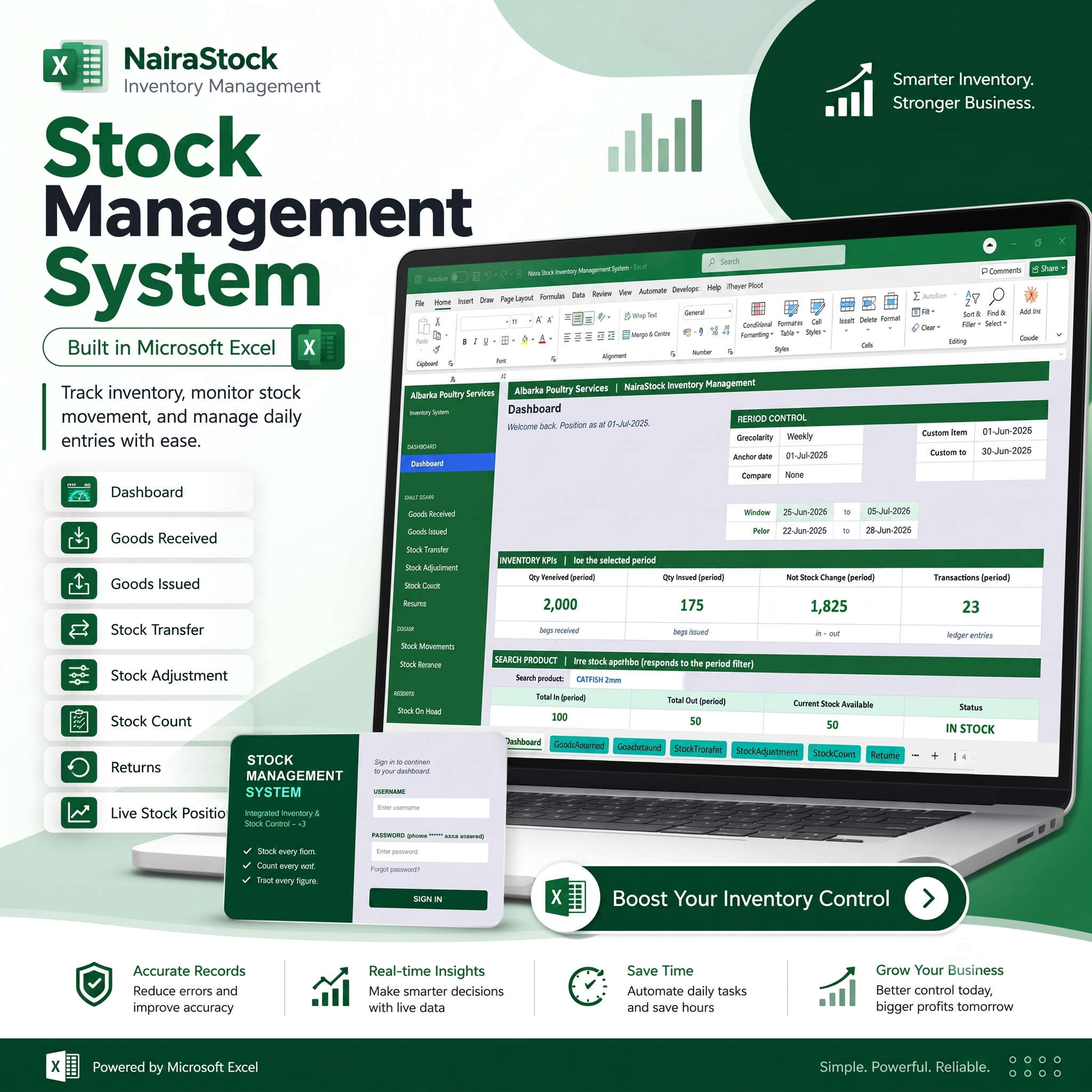
Inventory Management System

Click the video below to watch and learn how the application system works

A Complete Stock Management Tool Built in Excel
The Inventory Management System is designed to make stock control simple, organized, and reliable.
With this system, you can record daily stock activities and automatically view your inventory performance from the dashboard.
It helps you answer important questions like:
- How many items came in?
- How many items went out?
- What is my current stock balance?
- Which product is still available?
- Which product needs attention?
- How many stock transactions happened within a period?
- What is my stock position today?
Small business stress? This one says, “Not today.”
What You Can Do With the System
1. Dashboard Overview
View your major inventory figures in one place. The dashboard gives you quick insights into received stock, issued stock, net stock change, total transactions, and current stock status.
2. Goods Received
Record all stock coming into the business. This helps you know when items were received, the quantity received, and the product involved.
3. Goods Issued
Track all items issued out from stock. This is useful for sales, production usage, supply, distribution, or internal usage.
4. Stock Transfer
Move stock from one location, store, branch, department, or section to another while keeping proper records.
5. Stock Adjustment
Correct stock differences when there is damage, loss, shortage, surplus, or record correction.
6. Stock Count
Compare your physical stock with your system record and identify differences easily.
7. Returns Management
Record returned items properly so your stock balance remains accurate.
8. Stock Movement Report
See the movement history of each product and understand how stock flows in and out of your business.
9. Stock Balance
Know your available quantity for every product at any time.
10. Stock on Hand Report
View current available stock and make better restocking or sales decisions.
Why Your Business Needs This
Save Time
Stop spending hours checking books or calculating stock manually. The system helps you organize stock records faster.
Reduce Errors
Structured entries and automatic summaries help reduce mistakes in stock calculation.
Improve Stock Accuracy
Know your real stock position and avoid confusion between recorded stock and physical stock.
Make Better Decisions
Use the dashboard and reports to understand stock movement and plan ahead.
Avoid Stock Shortage
Monitor available stock so you know when to restock before it becomes a problem.
Look More Professional
Present your business records in a clean, organized, and professional way.
Perfect For
This system is suitable for:
- Poultry farms
- Retail shops
- Warehouses
- Small businesses
- Distribution businesses
- Production businesses
- Schools with inventory items
- Restaurants and food businesses
- Agro-allied businesses
- Supply and logistics businesses
- Building material sellers
- Spare parts dealers
- General merchandise businesses
If your business receives, stores, issues, or transfers stock, this system is for you.
How It Works
Step 1: Add Your Products
Enter the list of items or products you want to manage.
Step 2: Record Stock Activities
Add goods received, goods issued, stock transfers, adjustments, returns, and stock counts.
Step 3: View Dashboard and Reports
The system automatically updates your stock position, dashboard, and inventory reports.
Step 4: Make Better Decisions
Use the figures to know what to buy, what to sell, what is available, and what needs attention.
Built in Microsoft Excel
This system is built inside Microsoft Excel, which makes it simple and familiar for many business owners and staff.
You do not need complex software knowledge to use it. Once it is set up, you can enter records, check reports, and monitor stock from one place.
No monthly subscription.
No complicated installation.
No confusing software interface.
Just Excel, organized properly for inventory control.
FAQ Section
Frequently Asked Questions
Is this an online software?
No. It is an Excel-based inventory system. You use it directly inside Microsoft Excel.
Do I need internet to use it?
No. Once you have the file, you can use it offline.
Can I add my own products?
Yes. You can add and manage your own product list.
Can it track goods received and issued?
Yes. The system allows you to record goods received, goods issued, stock transfers, stock adjustments, stock counts, and returns.
Does it show current stock balance?
Yes. The system automatically helps you monitor current stock available.
Is it suitable for small businesses?
Yes. It is perfect for small and growing businesses that need organized stock control.
Can it be customized?
Yes. It can be customized based on your business type, products, and reporting needs.
Stop Guessing Your Stock. Start Managing It Properly.
Your stock is money. If you do not track it well, your business can lose profit without even noticing.
The Inventory Management System helps you stay in control, reduce errors, and make smarter business decisions with confidence.